

What software can turn a photo into a realistic PBR material for interior design renders in 3ds Max or Blender?
Matelume does this. It is a Windows app for interior designers that turns a flat photo, scan or catalogue image into a seamless PBR material at real size. You set the width in centimetres, choose how the surface is made, and export Color, Normal, Roughness and Displacement maps for Blender or for 3ds Max with V-Ray or Corona.
Matelume is made for flat images: scans, catalogue swatches and digital designs, not phone or camera photos.
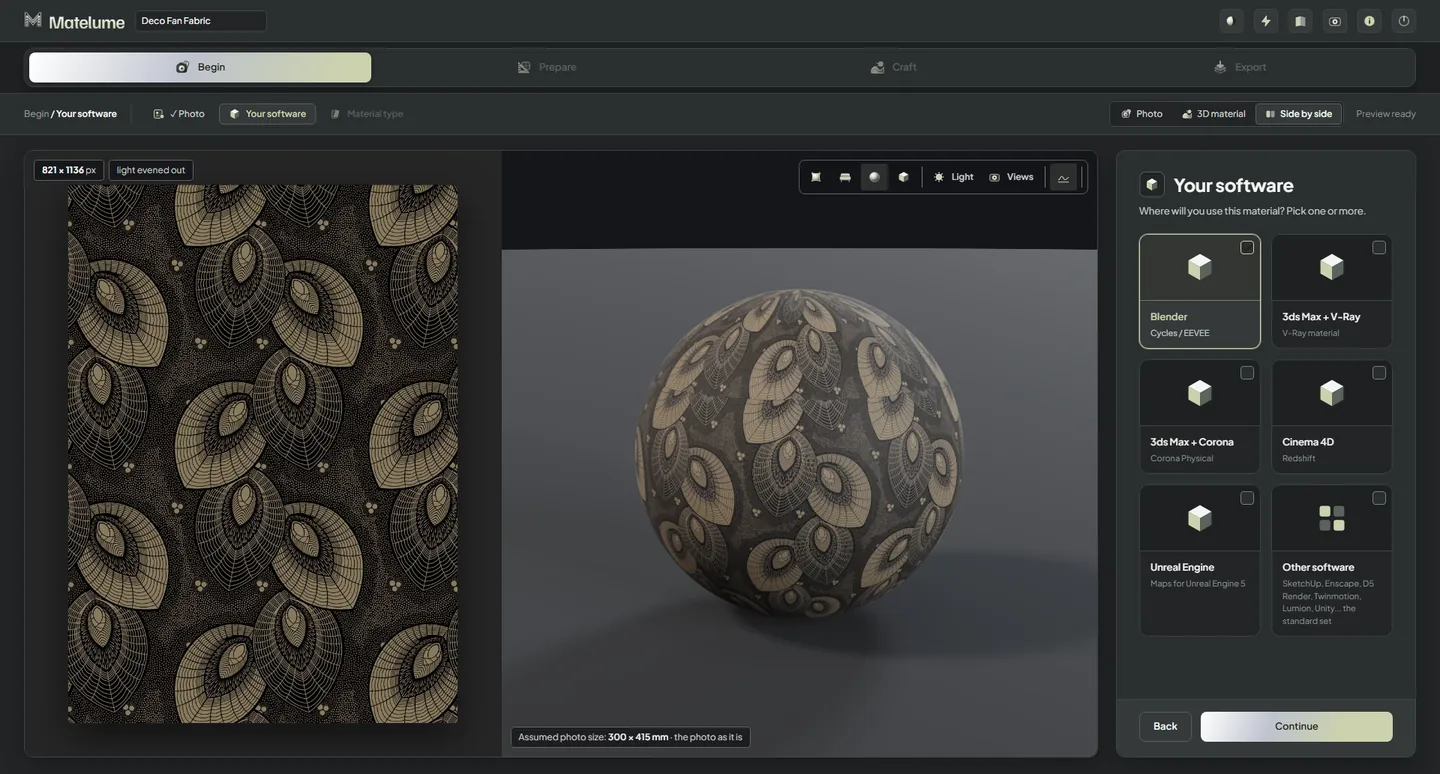
How Matelume turns a photo into a PBR material
- Begin. Add a flat photo (JPG, PNG or TIFF), pick the programs you use and pick the material type: Fabric, Marble, Wood, Wall art, Wall paint or Metal.
- Prepare. Choose the map size, from 2K to 8K. Type the real width in centimetres. Make one seamless tile, or use the image once where the material allows it.
- Craft. Choose what the surface becomes: stitching and weave for fabric, a soft relief and vein gloss for marble, finish and gloss for wood. A 3D view shows it live at real size.
- Export. Matelume computes the maps on your PC and saves them in one folder, with a .json of the real size and a how-to sheet for each program.
What you get for 3ds Max and for Blender
| You pick | Maps in the export | Getting it into your scene |
|---|---|---|
| Blender | Color, NormalGL, Roughness, Displacement | Send to Blender with the Matelume add-on 0.2.2, for Blender 4.2 or later. The add-on builds the material at real size. |
| 3ds Max + V-Ray | Color, NormalDX, Roughness, Displacement | Maps named and packed for 3ds Max with V-Ray, with the sheet USE_IN_MAX_VRAY.md. The Matelume 3ds Max package 0.1.2 can set the material up for you. |
| 3ds Max + Corona | Color, NormalDX, Roughness, Displacement | Maps named and packed for 3ds Max with Corona, with the sheet USE_IN_MAX_CORONA.md. The same package can set the material up for you. |
| Cinema 4D (Redshift) | Color, NormalGL, Roughness, Displacement | Set it up by hand from USE_IN_C4D.md. |
| Unreal Engine 5 | Color, NormalDX, Displacement and a packed ORM map | Set it up by hand from USE_IN_UNREAL.md. |
| Other software | All eight standard maps | SketchUp, Enscape, D5 Render, Twinmotion, Lumion, Unity and the rest: set it up by hand with the .json. |
Metalness comes too when your material has metal. Every map is one tile: your program repeats it at the size in the .json. Wall art is the exception: it exports a framed 3D asset as a GLB, and as an FBX when Blender is installed on your PC.
Read more: PBR maps for 3ds Max with V-Ray or Corona and turning an image into a Blender material.
Why the result holds up in a render
- Real size. Matelume can’t read real size from a picture, so you set it. Every later step is made at that size and the export carries it, so a stitch or a vein comes out the right size on the object.
- One relief. The normal map does the shading and the displacement map moves the surface, both from the same height. The how-to sheets show where each one goes, so the relief doesn’t count twice.
- Your image, not a new one. AI only enlarges your image, when it is smaller than the quality you pick, and helps read its shapes. The maps are computed from your image on your PC.
- Judged at distance. The 3D view has Close-up 30 cm, Furniture 1.5 m and Room 4 m, so you can see the material the way the render will.
Know the limits
- Matelume is made for flat images, not phone or camera photos. Perspective, folds, glare and uneven light get in the way.
- Matelume makes the material. Your 3D program renders the scene.
- 3ds Max: For Autodesk® 3ds Max® 2025 or later, with V-Ray® or Corona. We don’t claim renderer-specific test results for V-Ray or for Corona, and we show no 3ds Max render as proof. Wood in 3ds Max has not been verified for this release.
- Cinema 4D and Unreal Engine: the map sets follow each program’s standard slots, but we have not tested them inside those programs yet.
- Matelume runs on Windows 10 or 11, 64-bit. It needs an account and an internet connection while you work. Your images and maps stay on your PC.
- Use images you have the right to use. Matelume’s licence doesn’t give you rights to someone else’s fabric design, artwork or photograph.
Related questions
Does Matelume work with 3ds Max, V-Ray or Corona?
Matelume exports maps named and packed for 3ds Max with V-Ray or Corona. For Autodesk® 3ds Max® 2025 or later, with V-Ray® or Corona. The Matelume 3ds Max package can set the material up on your objects, or you can follow the how-to sheet in the export. We don’t claim renderer-specific test results for V-Ray or for Corona, and we show no 3ds Max render as proof. Wood in 3ds Max has not been verified for this release.
Is Matelume an AI material generator?
No. AI only enlarges your image, when it is smaller than the quality you pick, and helps read its shapes. The maps are computed from your own image, on your PC, with the choices you make at each step. Enlarging estimates detail; it can’t recover detail the image doesn’t have.
Is there a free trial?
Yes. The trial runs for 14 days from your first linked PC, with every Pro tool, full-size exports and no watermark. It needs an account and an internet connection, fur and other Max plan features are not included, and it does not start a paid subscription.
Try it with your own image
Matelume runs on Windows 10 and 11, 64-bit. The 14-day free trial includes every Pro tool, full-size exports and no watermark, and it does not start a paid subscription. An account and an internet connection are required.